Revenue cycle management software your team runs.
Your billing, streamlined in our software. Keep managing it yourself, or have us take it over. Valian is revenue cycle management software for practices. In the dashboard your team checks insurance in one click, builds and sends claims, follows each claim’s status, works denials and sees what each patient owes, all on one screen. Prior authorizations are run by our team, and if you would rather not run billing yourself, our team runs the same software for you.
15 minutes, by video or in person.
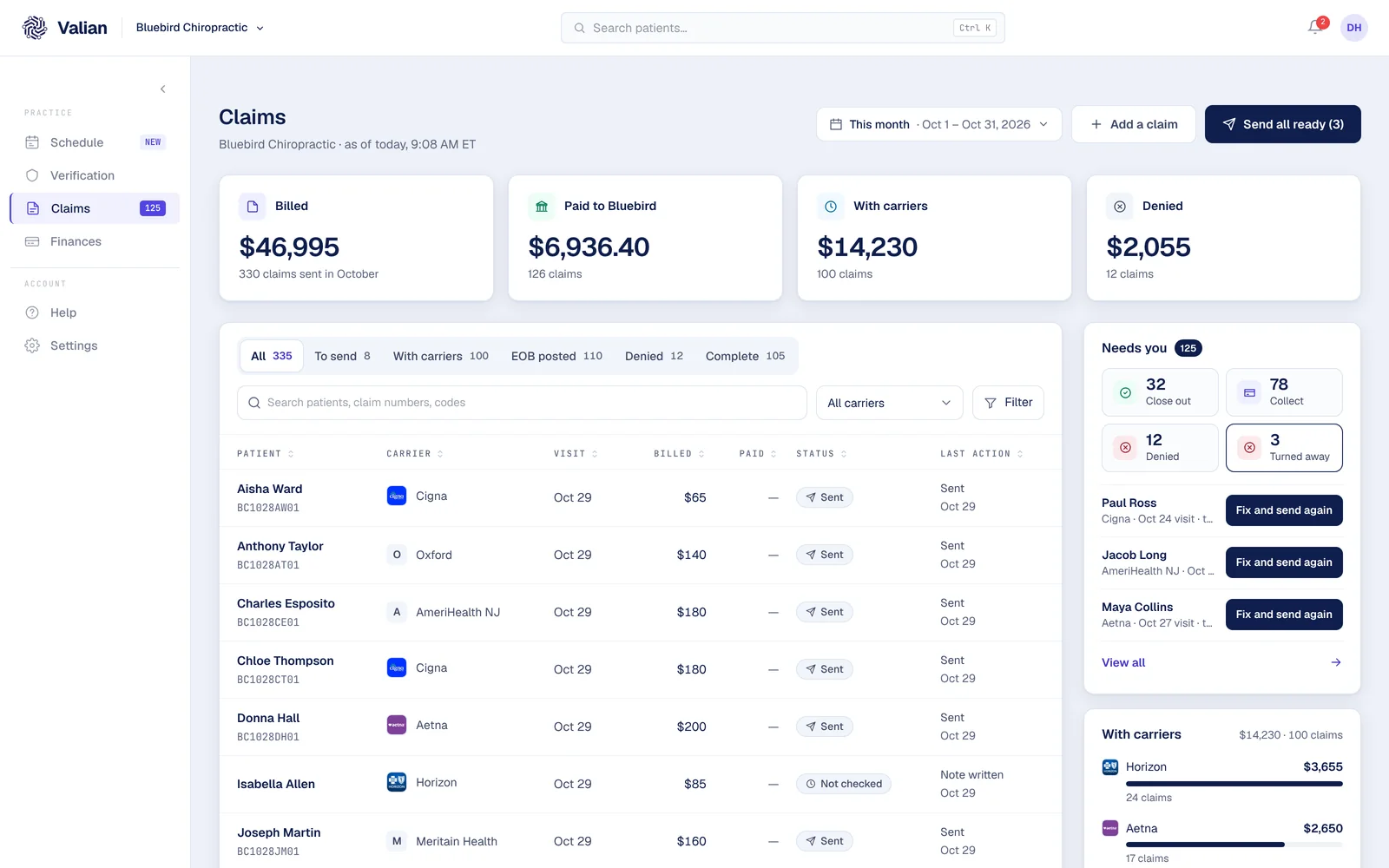
The real claims page, from a made-up office.
1,100+
payers answer an insurance check in seconds
Every claim
reviewed by Valian before it goes
15 min
free billing review, video or in person
BAA
signed before any patient data moves
Your billing, streamlined in our software.
Keep managing it yourself, or have us take it over.
Keep managing it yourself
Your team bills in Valian.
Checks, claims, EOBs and patient balances sit on one screen, so less of the day goes to portals and hold music. You keep the practice software you run today.
Have us take it over
Our team works your claims.
We send them, follow them up, post the payments and work the denials, all inside Valian. You see every claim and every dollar, every day, without asking.
What your team does in Valian, part by part.
Each part says whether it runs today.
Front office
E-check-in
Early accessPatients fill in their forms and add their insurance card before the visit, and it all lands on the patient’s record in the dashboard.
E-verification
LiveClick once on a patient and more than 1,100 payers answer in seconds, saved on the patient with the date. Or upload the ID and card photos, and the form fills itself.
Prior authorization
Run by our teamOur team files prior authorizations and follows them up. Your team sees where each one stands, right next to the patient.
E-payments
Early accessSee what each patient owes from that day’s check. Taking payments, at the desk or online, is being set up with our first offices.
Patient financing
Early accessFinancing for larger balances, offered from the same screen as the balance itself. We are adding financing partners now.
Back office
Coding checks
LiveYour doctor picks the codes. Before a claim goes, the dashboard checks it against the payer’s rules: diagnosis and procedure pairs, modifiers, required fields and the filing window.
Claims and billing
LiveBuild the claim from the visit and send it from the same screen. Every claim is reviewed by Valian before it goes, and its status updates on its own.
Payment posting
LiveWhen the carrier pays, the EOB posts to the claim: what the plan paid, what the patient owes, and the payment followed to your bank.
Collections follow-up
LiveValian asks the carrier where every open claim stands, and patient balances wait in one list until they are paid.
Appeals and denials
LiveA denied claim shows the carrier’s reason in plain words and the fix. Correct it on the same page and send it as a correction, never a duplicate.
E-reporting
LiveBilled, with the carrier, paid, denied: every claim and every dollar on one screen, each claim opening to its own page and history.
Live = running for offices today. Run by our team = our people do it for you. Early access = being set up with our first offices.
The screens your team works in.
What each one shows today.
Verification
Every patient’s check with the date it ran. Boxes a check cannot run without are red, helpful ones yellow, and a failed check numbers its next steps on the page.
Claims
Every claim by stage: billed, with the carrier, paid, denied. Each opens to its own page with the visit, the codes your doctor picked and the full history.
Finances
What was billed, paid and still open, on one screen. A full internal ledger is being built now.
Your fees, from a picture
Take a picture of your fee list. Valian reads it twice and keeps only the codes both reads agree on.
Payers that take claims through our network.
Every fact below comes from our payer directory: whether each payer takes claims electronically through our network, answers claim status requests and sends electronic remittances.
| Payer | Payer ID | Electronic claims | Claim status | Electronic remittance |
|---|---|---|---|---|
| UnitedHealthcare | 87726 | Yes | Yes | Yes, after a one-time enrollment |
| Aetna | 60054 | Yes | Yes | Yes, after a one-time enrollment |
| Cigna | 62308 | Yes | Yes | Yes, after a one-time enrollment |
| Humana | 61101 | Yes | Yes | Yes, after a one-time enrollment |
| Oxford | 06111 | Yes | Yes | Yes, after a one-time enrollment |
| UMR | 39026 | Yes | Yes | Yes, after a one-time enrollment |
| Meritain Health | 41124 | Yes | Yes | Yes, after a one-time enrollment |
| Oscar Health | OSCAR | Yes | Yes | Yes, after a one-time enrollment |
How starting works.
Six steps, from a 15-minute review to your first claims.
- 1
A free 15-minute review
By video or in person. We look at how billing runs today and show you the screen your claims would live on.
- 2
Sign the agreements
The Business Associate Agreement and the billing agreement are signed in the dashboard, before any patient data moves.
- 3
Connect what you run today
We will connect Valian to the system you run today, so your patients and visits come across. Nobody switches practice software.
- 4
Add your fees and codes
Take a picture of your fee list. Valian reads it twice and keeps only the codes both reads agree on.
- 5
Carrier sign-ups
Some carriers want a sign-up before claims and EOBs come through Valian. We file them, and any step that needs your office shows up in the dashboard.
- 6
Your first claims
New visits go through Valian from the day you start. Claims your current biller already sent can finish where they are, so nothing goes out twice.
What practices ask about revenue cycle management software.
What is revenue cycle management software?
Software that follows a practice’s money from the insurance check to the last payment: checks, claims, EOBs, denials and what patients owe, in one place.
What does my team do in Valian?
Check insurance in one click, build and send claims, follow each claim’s status, fix and resend denials, and see what each patient owes. Prior authorizations are run by our team.
Do we have to change our practice software?
No. You keep the system you run today. Claims are built and sent from the Valian dashboard, and every check and claim is saved on the patient.
Can we switch to having your team run it?
Yes. It is the same software, run by our team: we send the claims, follow them up, post the payments and work the denials. You can start one way and change later.
What does it cost?
We set your price with you after the review, based on how many claims you send. Nothing is charged until you agree to it.
See the software your claims would live in.
In 15 minutes we show you the real dashboard and look at how your billing runs today.
- The real dashboard, not slides
- Every claim reviewed before it goes
- 15 minutes, video or in person
- A BAA before any patient data moves
1. Pick a time
15 minutes · times in Eastern Time (ET)